I rebuilt my site. Not because it was slow or not performing the way I wanted, though it was.
It was built on WordPress, using the Astra theme and Elementor, now the new version runs on Astro, Keystatic, and Cloudflare Workers. The main reason behind the change was actually how I wanted to work on the site: an agentic workflow where AI does most of the building, with my content stored as plain markdown files I own rather than in a MySQL database that I actually don’t need, and with full control over everything.
And as a bonus, performance improved too, and I measured it.
The short version
- AI can fully work on the site. Every page, component, and post is a file in Git. An AI agent can read, write, and edit it. I can then review the changes, ensuring that nothing goes live until I approve it.
- I own the content. Posts live as Markdown in a repository, not rows in a MySQL database. Making a future migration to another stack much easier.
- I control the markup directly, not behind a 3rd party plugin. I can then create one consistent entity about myself across the whole site, clean HTML, and structured data I define.
- Better structure and Information Architecture. Full control of the pages I build in a much easier development/maintanance workflow.
- A new identity. Brand, design system, and LP layouts built from scratch with Claude Design based on my own needs and feedback, instead of a fixed theme built by somebody else.
- Easier to maintain. No core, theme, page builder, or plugin updates to keep up with.
- It’s WAY faster. Serving static HTML pages directly from the edge transforms any website into something as fast as an F1 car compared to a normal street-legal family car. Median LCP was 6.2 seconds on mobile before, and it’s 2.0 seconds now. A pretty good bonus, I’d say.
1. I wanted AI to work on my site
I built an agentic workflow where I now use AI for design changes, code, and first content drafts. That can only work if the AI agent can see and change what it’s working on.
On Elementor, a page layout was stored as a large JSON blob in the database. An agent could push text through the WordPress API, but changing a layout meant editing that blob, and reviewing the change was close to impossible. And then I would find out what changed by looking at the live page.
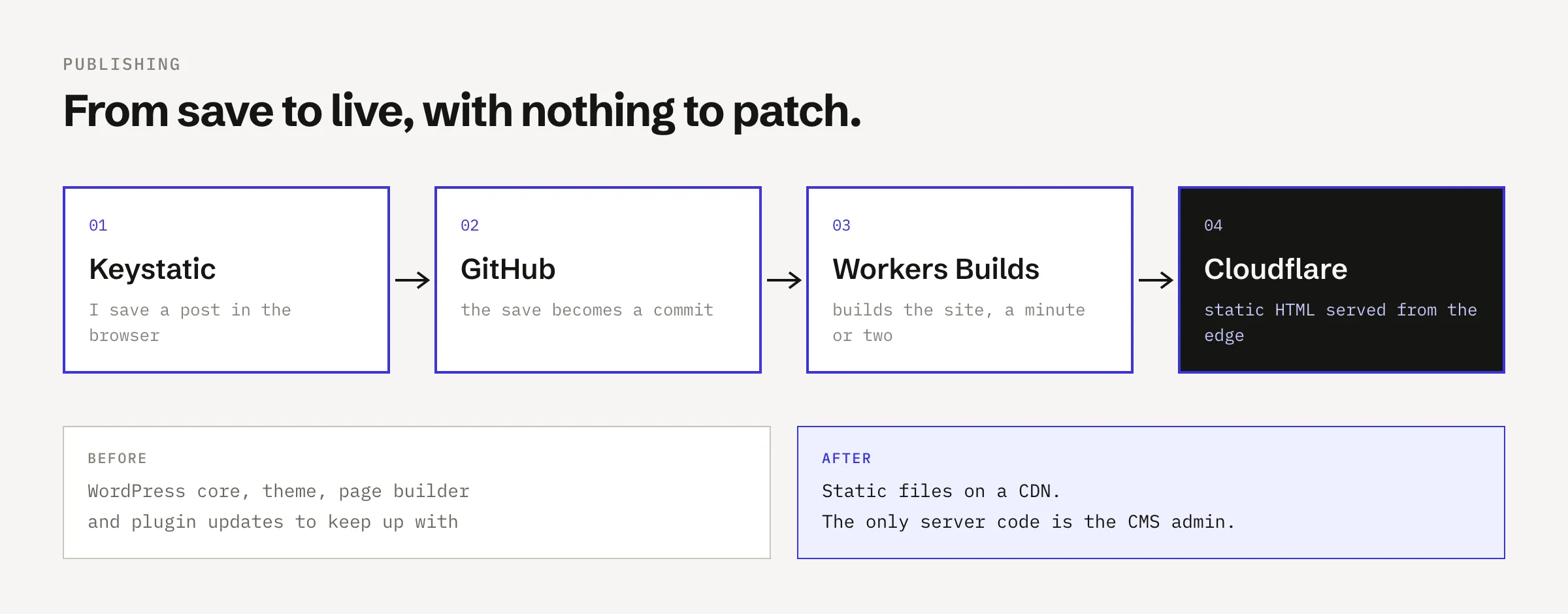
On Astro, every page, component, and post is a file in a Git repository. An agent edits the files, I read the diff, and nothing is published until I merge it. Every change is visible, every change is reversible, and the full history is there, no extra backup is needed.
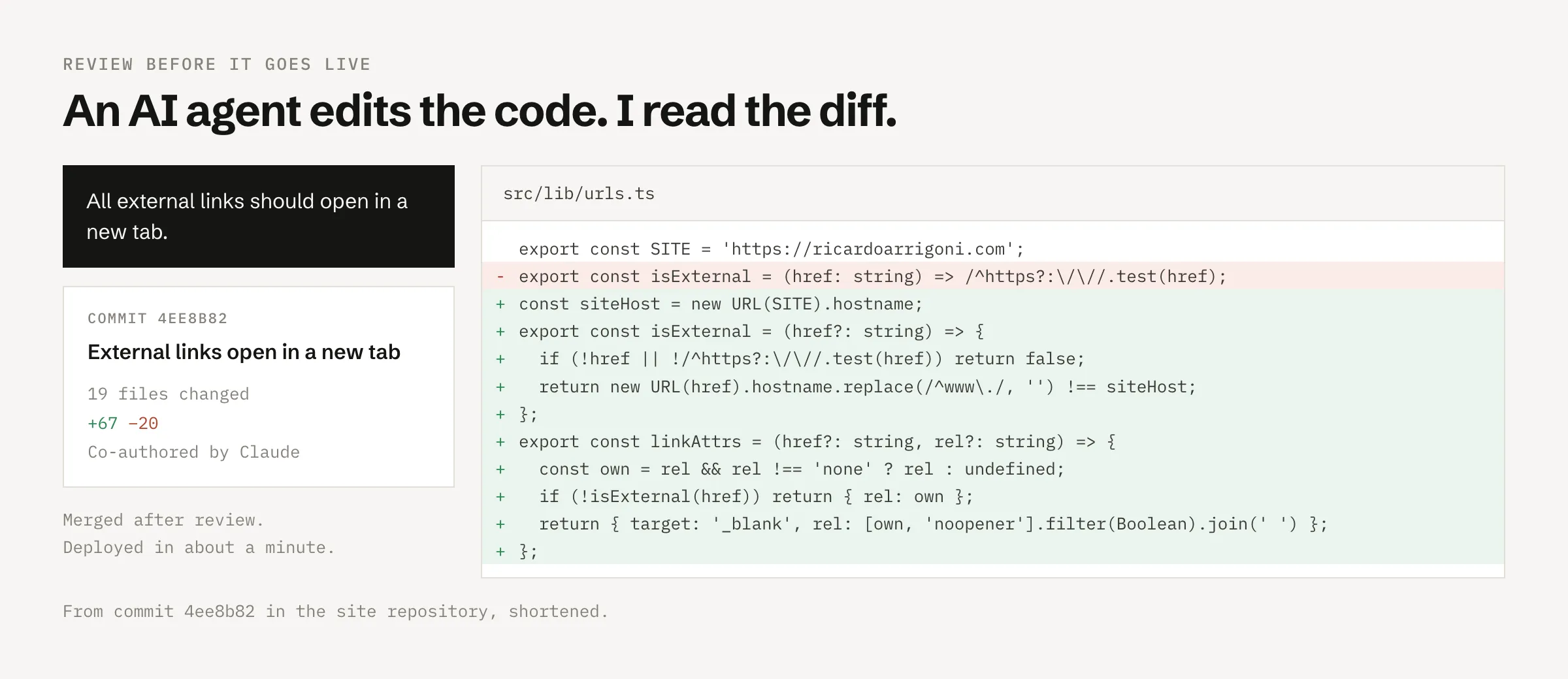
That was the main reason that made the decision. The rest made it easier.
2. My content should be plain files I own
Posts and pages now live as Markdown in a private GitHub repository. No database, no export format, no theme lock-in. If I change frameworks again in five years, the content moves as text files.
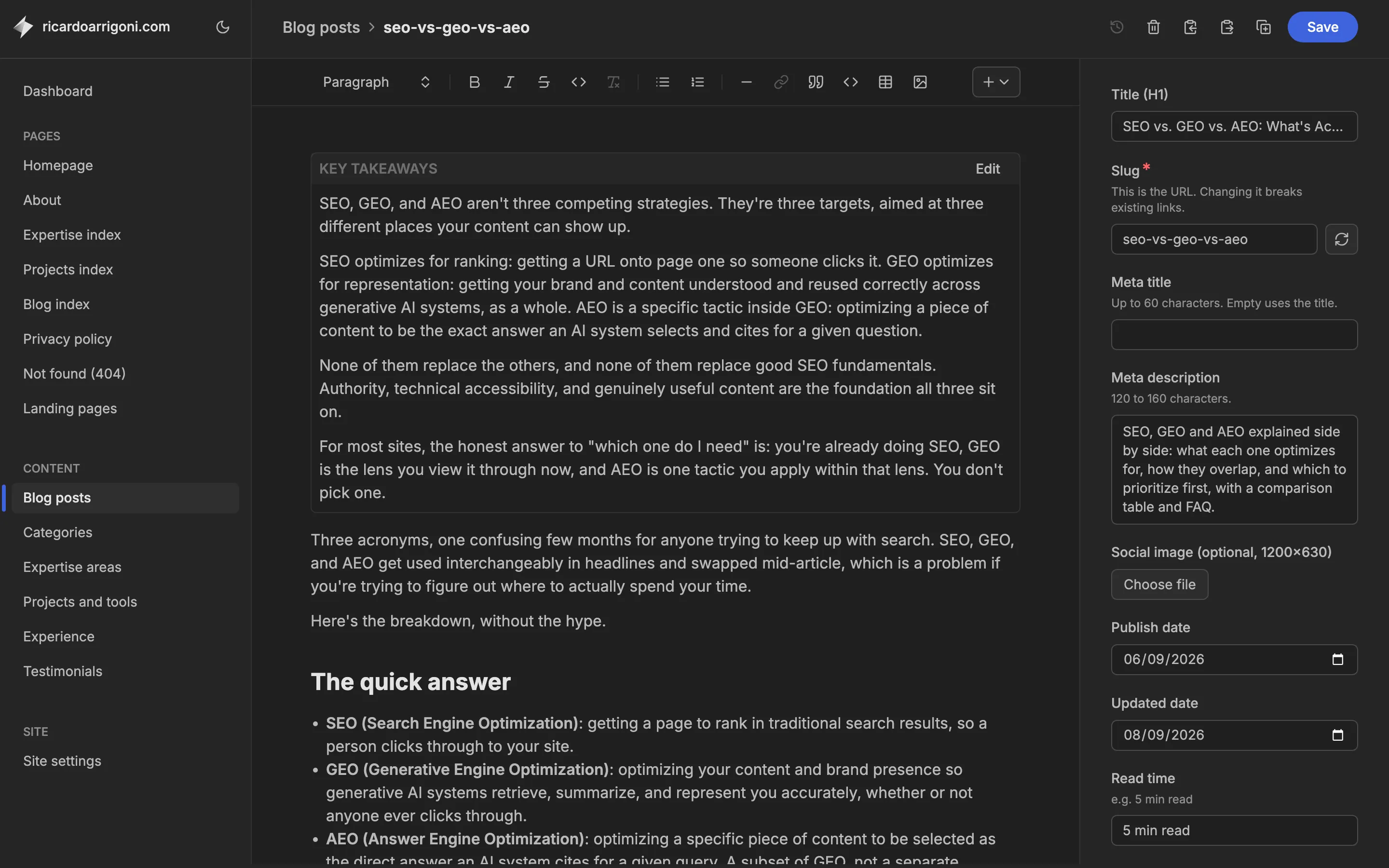
I still have an editor. Keystatic gives me a browser interface to write posts, swap images and edit page text, without touching code. Every save becomes a commit. So I edit content myself, and AI handles design and code, in the same repository.
3. Control over every byte of HTML and structured data
I work specifically on how search engines and AI systems understand and rank entities, so my own website should get that right, and it’s been neglected for far too long.
WordPress has a much more complicated structure for the needs that I actually have. Don’t get me wrong, I’m not saying it’s bad, but it adds way too many unnecessary things for my unique use case, making the setup and the maintenance more costly.\
Things that before needed a plugin can now be added with a simple prompt, like, for example, the schema markup.
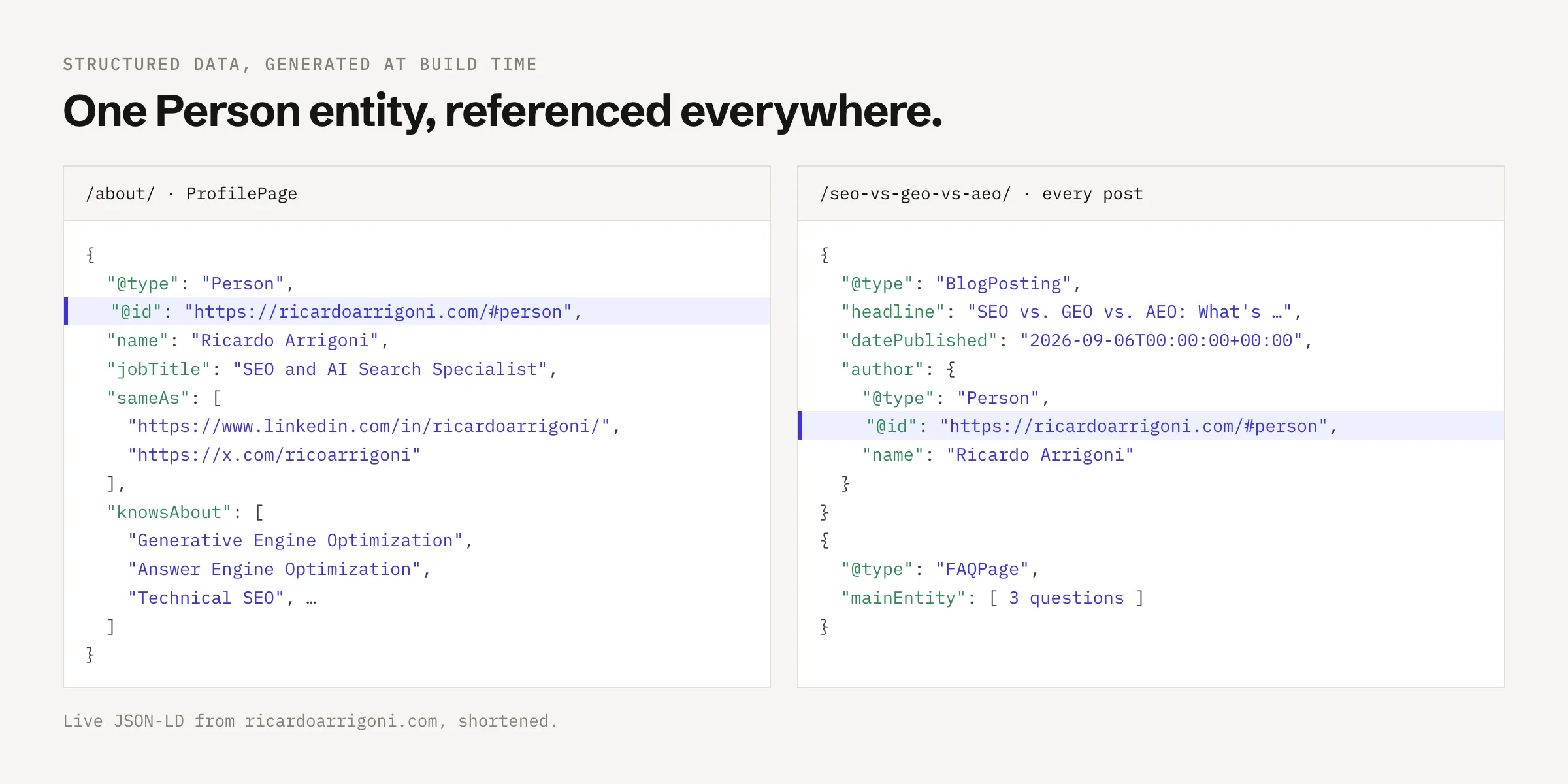
On WordPress, that means working around the theme, the page builder, and the SEO plugin, which each wanted to output their own version of the markup.
One thing WordPress does well, though, is that the content is already in the HTML. Elementor renders the content on the server, not the client, so crawlers and AI bots can read the text without running JavaScript.
4. A better structure
My previous website used to be just a resume-style page where I had everything in it: bio, expertise, work experience, testimonials, etc. Now, it’s much more than that.
- The Home is now a summary that links out to the other pages.
- About has the full bio and work experience.
- Expertise shows the areas I’ve spent most of my 10+ years working on organic search. It explains how I approach SEO and GEO.
- Projects show apps and tools I built, whether to improve my productivity at work or in my personal life.
- And last but not least, there’s the Blog, where I’m now able to include many more features and apply SEO/GEO best practices more easily without stuffing the page with a bunch of plugins and unnecessary code.
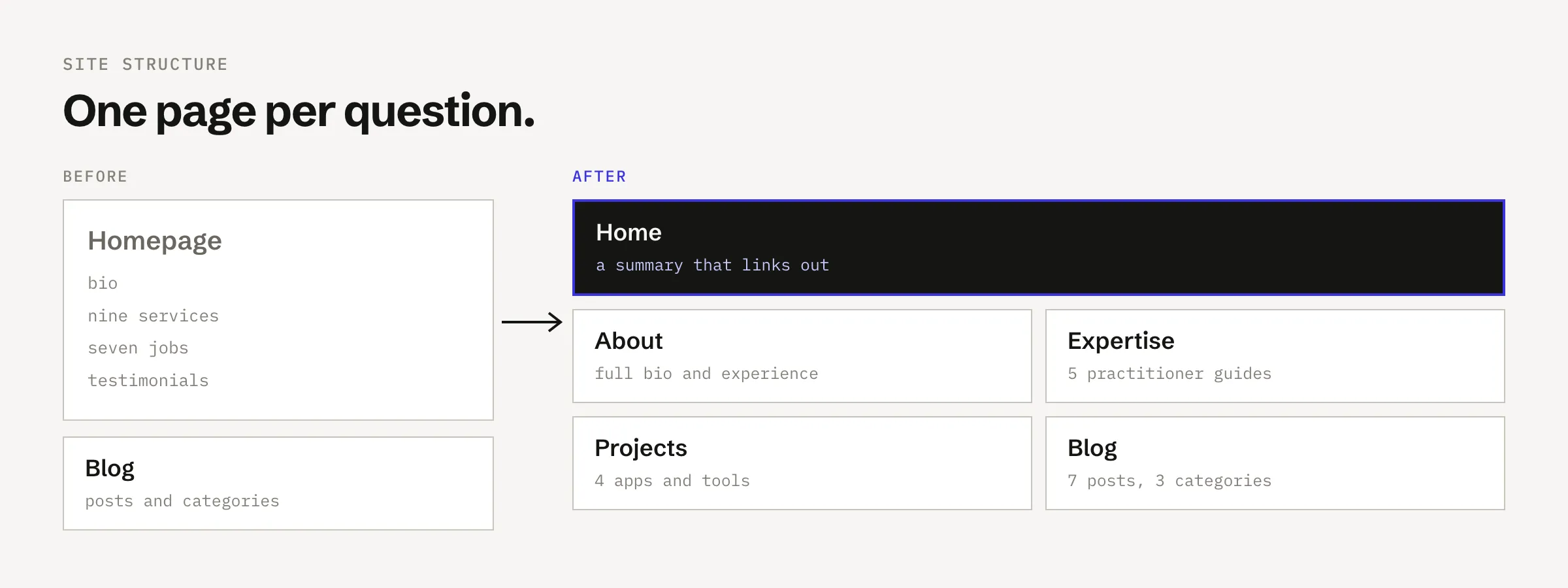
Each page answers one thing. That’s easier to navigate, and it gives search engines and AI systems distinct pages to match to distinct questions.
5. A new design system, built with Claude Design
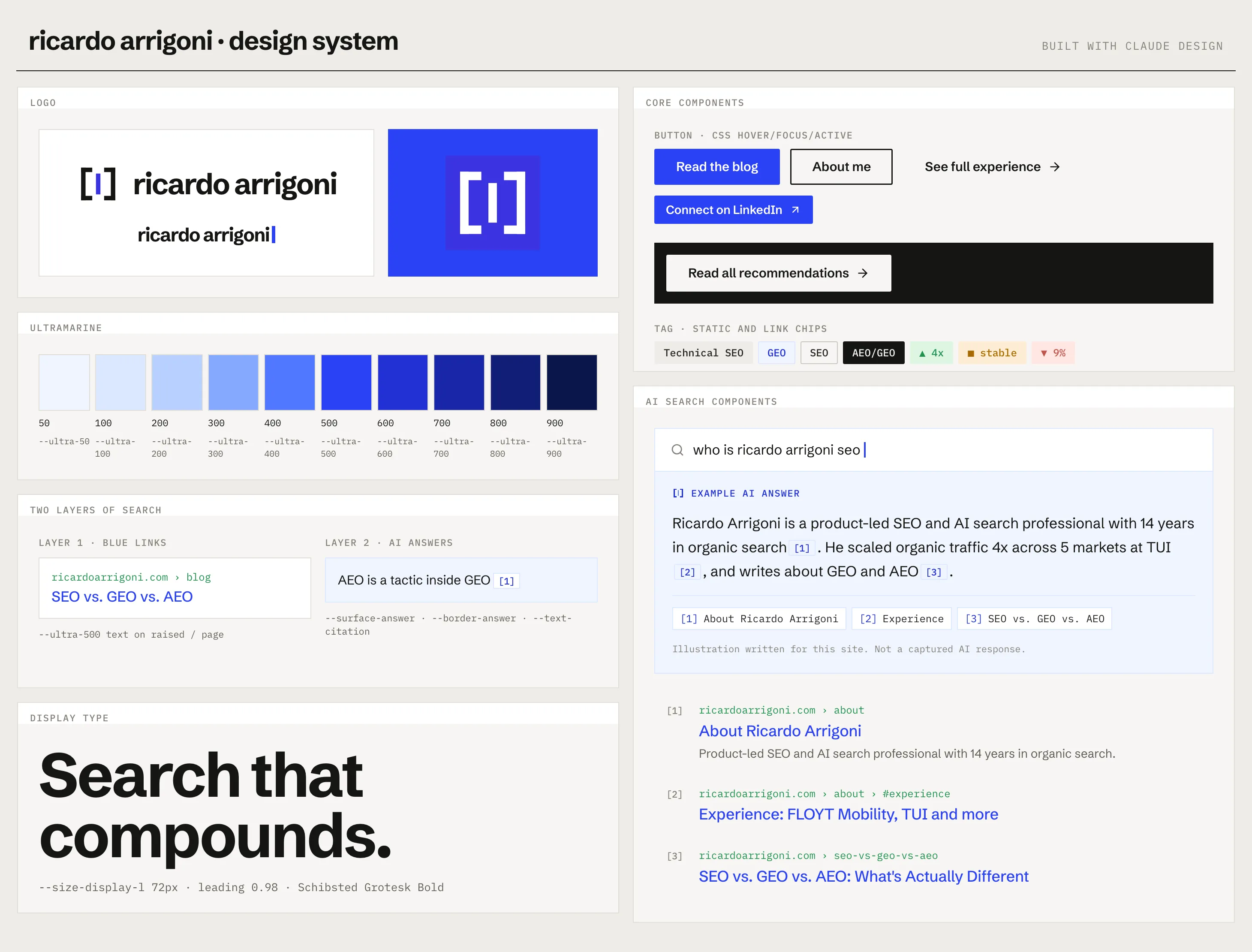
I didn’t simply migrate the old theme. I used Claude Design to create a brand new identity from scratch: the brand, the design system, and the layout of every single page and component.
What came out of it:
- A logo, a wordmark, and a favicon.
- One accent colour on a warm off-white page, and two typefaces.
- 27 components, from buttons and tags to an AI answer panel with numbered citations.
- Layouts for all 12 page templates, a clickable prototype and 28 screenshots.
- A handoff bundle to Claude code: design tokens, component CSS, the content model for the CMS, the page content, SEO rules and redirects.
What worked
- It was build-ready. Everything was handed over in a format that Claude Code could understand and execute without any problems. The design tokens and the CSS components went into the site almost as they were in the design prototype.
- Claude Code followed the rules of the build by Claude Design. Thanks to the handover, hover states, accordions, and the mobile menu were already plain CSS and
<details>elements, so every page works without JavaScript, ensuring that every bot can fully render its content. - New images stay on brand. Project illustrations, social images, and the cover of this post are built from the same colours and fonts of the brand kit, creating consistency and saving a lot of work.
What didn’t
- Some referenced files were missing from the bundle.
- Two self-hosted typefaces cost weight. The fonts are the one part of the page that got heavier, as the numbers below show.
In a few hours on a Saturday morning, I had a full design system and a brand-new website done and live.
This would’ve taken me days, if not months, to do with WordPress + Elementor. Not to mention the design part, which is completely outside my skill set.
I would’ve needed to hire a professional designer to create it for me (which I highly recommend you do when you’re working on a proper and important project).
For my own personal website/blog, I would never have a proper designer building this for me simply because it was not worth the time and money.
6. Less to maintain
Having a WordPress website adds a new layer of maintenance as it needs constant updates: core, theme, page builder, plugins. Each update is a small chance of something breaking, and each plugin is an attack surface. Too much risk for too little return.
The new site is now fully static HTML on a CDN. The only server code is the CMS admin. So, there’s almost nothing to patch.
7. Performance, measured
Now the numbers. Everybody knows WordPress adds a lot of unnecessary scripts in the source code. Although simple and usually fast, WordPress websites can easily become very slow depending on how many plugins and junk you add to it.
Before the switch, I crawled the site with Screaming Frog and pulled PageSpeed Insights data for all HTML pages and stored the results because I wanted to compare after the migration. The day after launch, I ran the same crawl again.
| Metric (mobile, lab) | WordPress + Astra + Elementor | Astro + Cloudflare |
|---|---|---|
| Performance score | 61 to 77 (median 65) | 98 to 99 (median 99) |
| Largest Contentful Paint | 5.3 to 6.5 s (median 6.2 s) | 1.9 to 2.2 s (median 2.0 s) |
| First Contentful Paint | 2.2 to 4.6 s (median 4.4 s) | 1.2 to 1.8 s (median 1.6 s) |
| Total Blocking Time | 33 to 460 ms (median 101 ms) | 0 ms on every page |
| Cumulative Layout Shift | 0 to 0.002 | 0 on every page |
| Page weight | 684 to 793 KB (median 720 KB) | 166 to 372 KB (median 196 KB) |
| JavaScript | 565 to 657 KB, 30 to 32 files | 13 to 44 KB, 2 to 5 files |
| Third-party resources | about 366 KB per page | about 11 KB per page |
| Requests | 54 to 72 (median 55) | 12 to 23 (median 13) |
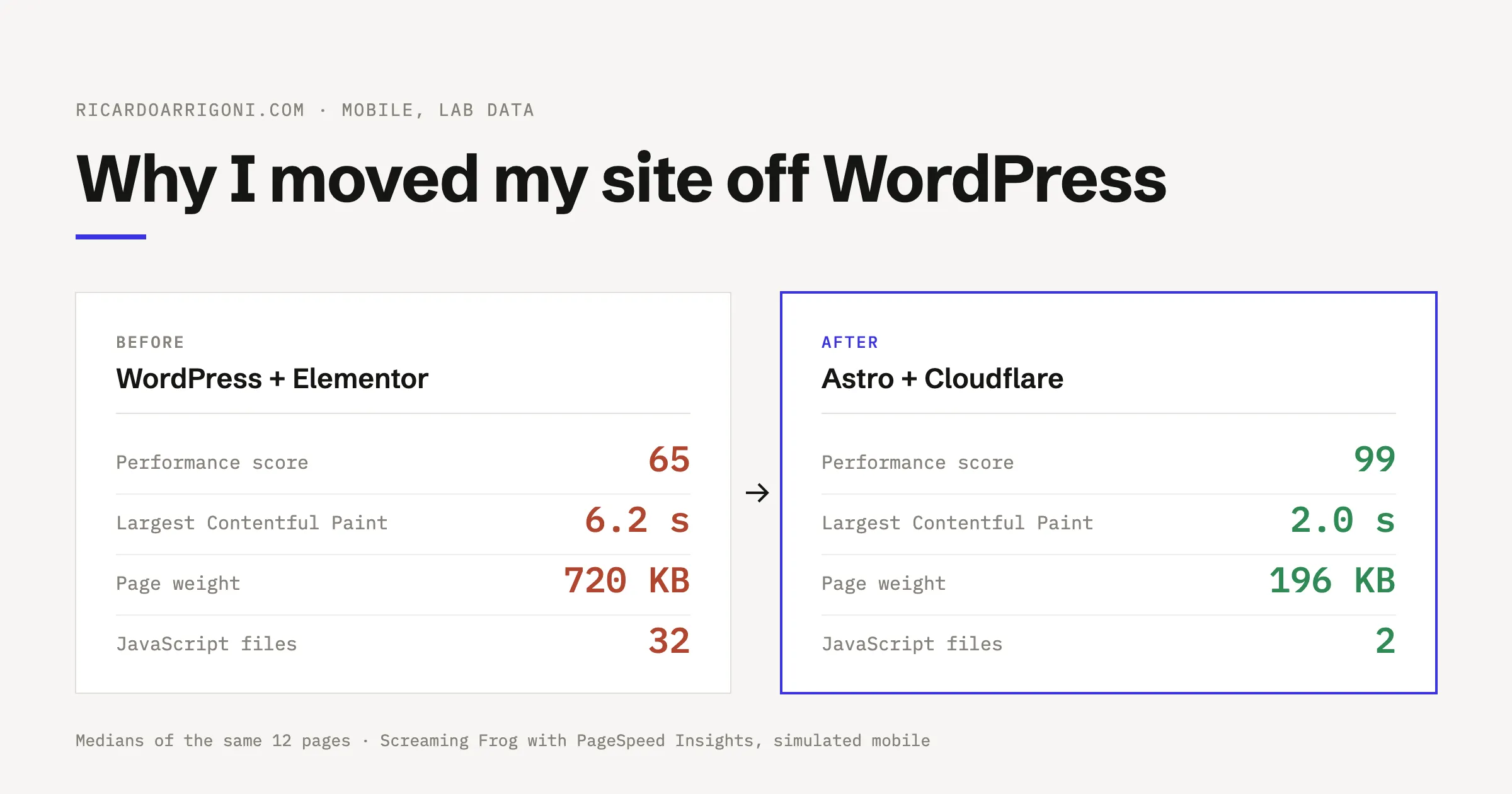
Google’s threshold for a good LCP is 2.5 seconds. On WordPress, every page was more than double that. On the new setup, every page is under it.
The weight was mainly unnecessary code, not content: JavaScript was 82% of the page weight, and images on most pages added up to just 15 to 65 KB.
A 6,800-word post and a 100-word category page weighed almost the same, because the template and the wordpress theme were the main reason for carrying the weight of the page, not the content itself.
Layout shift was already close to zero, therefore, CLS was never a problem. The pages just used to take a long time to show up for the users.
Blocking time was mostly fine: The browser wasn’t choking on the JavaScript once it had it. The cost was: downloading and parsing all of it before the main content painted.
Where it came from, on every page:
- Elementor’s front-end scripts and per-page CSS.
- jQuery, jQuery Migrate and jQuery UI core.
- A table of contents plugin with scripts for sticky behaviour, smooth scrolling and a cookie library.
- A lazy-loading script from the caching plugin.
- A script from Astra’s starter templates plugin, a tool for importing site templates, loading on the public front end.
- An internal linking plugin’s script.
- About 366 KB of third-party resources.
None of these were unusual for a WordPress site. Each plugin was solving a small problem and added its own assets to every page, whether the page needed them or not.
Lighthouse estimated about 160 KB of the JavaScript went unused on a typical page because of that.
Why this wasn’t reason number one for the migration
Page speed might not be exactly a ranking signal, but it’s an important user experience driver. Especially when several pages are equally relevant in the SERP.
For AI search, so far, I haven’t seen any solid evidence that speed affects whether a page gets cited. What matters the most is that the content is in the HTML when a crawler fetches it, and the old site already had that.
If speed had been the only problem, I could’ve just removed plugins and switched to a lighter theme.
Nevertheless, I would be lying if I said that this wasn’t one of the triggers that made me rebuild the website entirely. Not the main reason, but it definitely helped start this all.
8. Cost
The new setup runs on Cloudflare’s free tier while the WordPress site needed paid hosting. Not the reason, but definitely an extra bonus for the move.
What I gave up with the migration
-
No drag-and-drop editing anymore: Before, with Elementor, I had full flexibility and hability to change the layout however I like. Was I doing it? No, but still, it’s something I list.
Layout changes now mean editing components directly in the code. Now AI does most of that for me while I just explain what I want and how I want, but if you like building pages visually, it’s a real loss.\
-
No plugin for everything: WordPress has been around for several years. It’s the most used CMS of all time, meaning there’s a plugin for pretty much EVERYTHING you wanna do, if not you can simply build one yourself if you’re into coding (since WP runs on PHP, it’s not too difficult to build things for it).
On the other hand, I feel like it’s way easier now. Whenever I need something, I just ask my AI agent, and it builds it directly in the code.
So, my personal experience is that it is 1000x easier now than it was with WordPress (even with its huge library of things).\ -
Publishing isn’t instant: Each save I make in the KeyStatic CMS triggers a commit in GitHub and a rebuild in Cloudflare that takes between a minute and two to be live.
In WordPress, every save is pretty much instant, but to be fair, I’m ok with the 1~2min wait to see things live. I can definitely live with that. -
More setup up front: Since I had to build everything from scratch (Schema, redirects, image handling, and the CMS configuration), the initial setup takes way longer than it was with WordPress.
With WP, you can install it, activate the theme, and boom, everything is there ready to be used.
With this setup, everything needed to be built from scratch at least once, and whatever new feature I decide to have, I’m gonna have to build it from zero.\
The new stack
- Astro, with every content page prerendered as static HTML. JavaScript is used only where a component needs interactivity, and is never required to show the raw content, making it ready and easy to read for AI Crawlers.
- Keystatic as the CMS, storing content in GitHub. Every save is a new commit that I can easily roll back if needed.
- Cloudflare Workers with static assets for hosting, deploying on every commit. That’s why it takes 1- 2 min for updates to go live.
- Claude Design for the brand: the entire design system and the new page layouts were entirely built by Claude Design with my instructions. I gotta say that I’m quite impressed with the quality of the output.
Keeping the migration clean
Migrations are where sites lose rankings, so the plan was to cover the basics of any CMS migration:
- Every post kept its own URL, including the trailing slash.
- Category pages kept their URLs.
- WordPress system (and not so relevant) URLs (feeds, author pages, old sitemaps, category base paths) got 301 redirects.
- Images in existing posts kept their original paths, so links to them keep working.
- A complete re-crawl after launch, comparing the new pages against the baseline above.
Sometimes, when we migrate a website, we also do content pruning. Most sites have way too much unnecessary and irrelevant content (driven by old SEO Techniques that made a lot of website owners believe that the more, the better, flooding the web with shitty content).
In this case, I actually increased the number of pages as I added projects and expertise pages, increasing the range of topics and information I share on my website.
The results
The new site went live on 10 October 2026. The next after the migration I re-ran the same Screaming Frog crawl with PageSpeed Insights API, simulated mobile, etc. The numbers speak for themselves.
- Performance: 98 to 99 on every page, up from 61 to 77.
- LCP: median 2.0 seconds, down from 6.2. Every page is now under Google’s 2.5-second threshold.
- JavaScript: 13 KB in 2 files on most pages, down from about 590 KB in 32 files.
- Third-party code: about 11 KB, down from about 366 KB. The only third-party script left is Cloudflare Web Analytics.
- Total Blocking Time: 0 ms on every page.
I also ran PageSpeed Insights on the homepage on its own: Performance 98, Accessibility 100, Best Practices 100, and SEO 100, with FCP 1.8 s, LCP 2.1 s, Speed Index 1.8 s, Total Blocking Time 0 ms, and CLS 0. It passed both Agentic Browsing checks too.
What didn’t improve
- Fonts got heavier: 111 to 138 KB per page, against 43 KB before. The site now serves its own two typefaces, Schibsted Grotesk and IBM Plex Mono.
- Most of what PageSpeed still flags is the analytics script: Cloudflare’s beacon has a one-day cache lifetime and about 11 KB of legacy JavaScript. It’s Cloudflare’s code, so it stays as it is and I can live with that.
In the end, I’m quite happy with the change and will continue to monitor the performance of the website as I add more features.
The possibilities that this new setup gives me are endless. I’ll definitely build more cool things to share here with you guys. Whether it’s a guide, a skill, a workflow, or a new app.
Stay tuned!
Related posts

SEO Tools: The Ultimate Guide
The SEO tools worth knowing for research, technical audits and reporting, and what each one is good at.

How to create 301 Redirects with .htaccess
A 301 redirect permanently sends one URL to another. Here is how to set them up in an .htaccess file.