
What it does
AI Usage Tracker is a Mac menu bar app that shows how much of your AI plan limits you have left and where your usage went. It works with Claude for now, and your data stays on your Mac.
The problem
Claude plans have a session limit that resets every five hours and a weekly limit. When you work across several projects, it's hard to tell how close you are to either one, or which work used them up.
I wanted both answers in my menu bar, without sending my usage data anywhere.
How it works
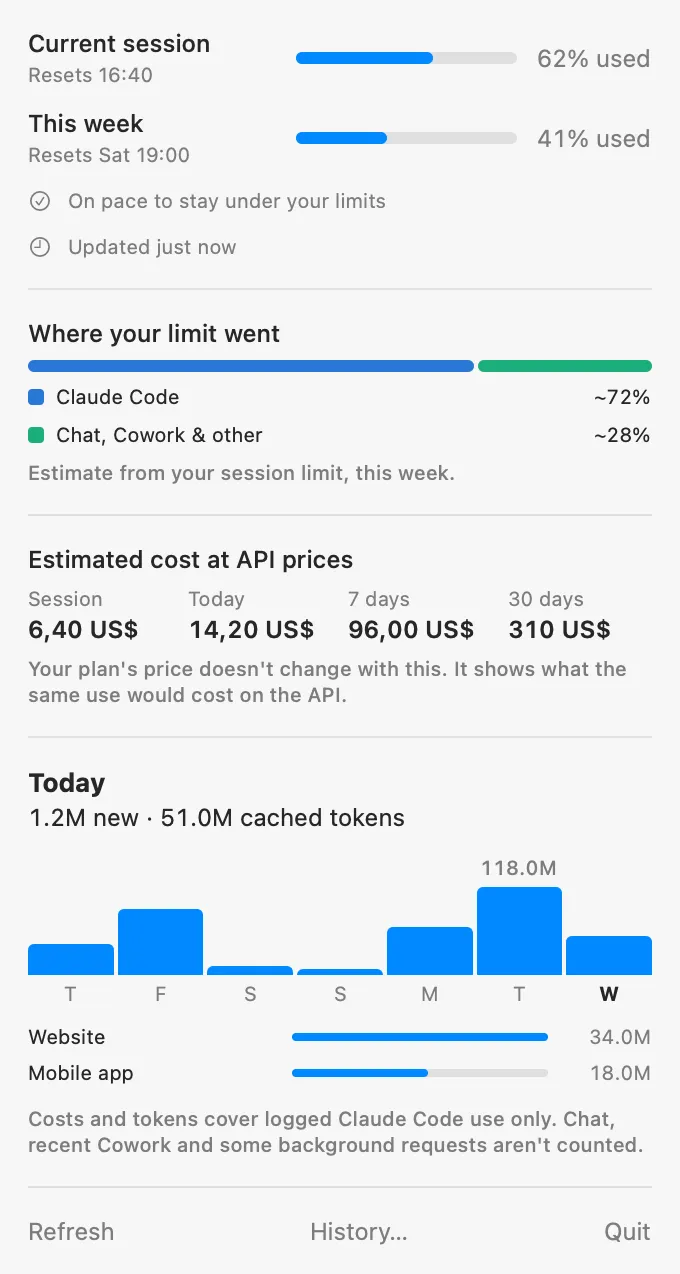
The menu bar shows whichever limit is fuller. Opening the panel shows the current session and weekly limits, your pace, today's usage, and what your logged use would cost at API prices. That cost doesn't change what you pay for your plan. It shows what the same use would cost on the API.
A History window breaks usage and cost down by day, project, model, and session, and the app sends a notification when a limit reaches 80% and 95%.
The limit readings come from a small Claude Code status line script, and token counts come from the logs on your Mac.
The app saves only numbers, model, project path, session ID, and timestamps in a local database. It never reads message text into that database or sends your usage anywhere.
The only request it can make is for the European Central Bank's exchange rates when your Mac's currency isn't US dollars, and it carries nothing about you.
The numbers have their own limits. The logs miss some requests, so totals are a lower bound. "Where your limit went" is an estimate, because Chat usage has no token counts on the Mac.
For now, it only works with Claude and only runs on my Mac, so there's no download yet. I plan to add other platforms and share a .dmg file later.